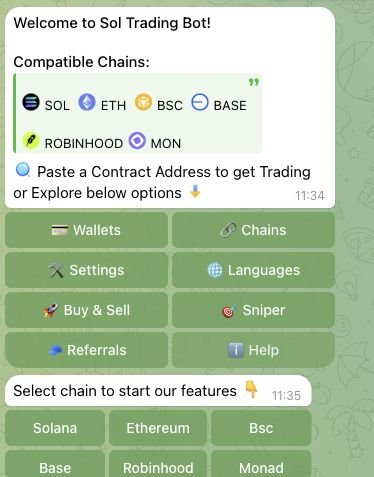
SolTradingBot supports Monad token trading in its shared Telegram bot. The live Monad order panel exposes market buy/sell, limit buy/sell, take-profit, stop-loss, trailing-stop and partial-exit controls.
Select the network before entering a token contract. Chain selector checked 28 October 2026.
SolTradingBot on Monad: quick answer
SolTradingBot is active on Monad through Telegram. The verified Monad panel offers swaps, limits and configurable exits. The platform fee ceiling is 1%, but an exact Monad rate has not been confirmed. Keep the network’s native asset available for transaction costs.
Latest official Monad update
Official announcement names Solana, Robinhood, BSC, Ethereum, Base and Monad; current UI independently checked 2026-10-28.
Open the existing SolTradingBot referral entrypoint and select Monad inside Telegram. Confirm the selected chain before pasting a token contract. During the 28 October 2026 walkthrough, a Uniswap V3 label appeared beside a token-specific order form. This observation establishes a visible route and controls, not a completed trade or support for every market.
The current form offers Swap and Limit modes, limit buys and sells, percentage-based partial exits, TP/SL and trailing-stop settings. Review the direction, amount, trigger and expiry before placing an order. DCA is unverified. A Copy menu is present, but a menu alone does not confirm a working copy configuration. Sniping and Solana feature parity are unverified.
The product-wide platform fee ceiling is 1%; the exact Monad rate remains unverified. Network gas, priority/tip where applicable, and DEX/protocol costs are separate. The Monad interface exposes gas and manual slippage settings. A gas setting is not evidence of private routing or MEV protection. Mode-specific and referral-adjusted fees remain unverified.
The shared Telegram wallet manager groups a Solana address and an EVM address in each wallet bundle. EVM chains share an address within the bundle, while Monad has a separate balance. Select the destination network carefully before any deposit. Multi-wallet creation is confirmed; custody, exclusive key control, external wallet connection and shared order history remain unverified. No funds were deposited and no orders were submitted in this audit.
The WMON panel displayed Uniswap V3 and MON-denominated order controls. A separate USDC lookup produced an incomplete aggregator preview without a usable router. Token discovery does not guarantee a valid route for every Monad token; check the actual quote before proceeding.
A Monad-specific platform fee is not verified in the record. Check the quoted fee in the product before trading.
Rewards and referral programmes can have eligibility rules. The product-wide reward model is cashback; a Monad net fee or cashback rate is not calculated without a confirmed chain-specific schedule. Understand total trading costs →
Only Monad venue lists and execution mappings are used here.
Explore all technical details
Monad feature
SolTradingBot
Slippage control
Manual
Internal wallets (product-wide unless stated)
Yes
Reward model (product-wide)
Cashback
Referral model (product-wide)
Revenue Share
Where the record is useful — and where it stops
Confirmed capabilities
Limit orders: Yes on Monad.
Multiple wallets: Yes on Monad.
Internal wallets: Yes on Monad.
Check before funding
Platform trading fee requires further verification.
Wallet model requires further verification.
Sniping requires further verification.
Copy trading requires further verification.
A feature list does not establish execution quality or profitable trades.
Wallet setup for Monad bot trading
Use a dedicated trading balance and retain MON for network costs. MetaMask is a current Monad wallet option; Phantom support has ended.
Only import a bot wallet if it provides an exportable self-custodial key and the target wallet supports that key format. Importing does not revoke the original bot’s access.
Yes. The official multichain announcement and a live Monad token order form were checked on 28 October 2026. Use the shared SolTradingBot Telegram bot and select Monad before looking up a token.
What does SolTradingBot charge on Monad?
The platform fee ceiling is 1%, but an exact Monad rate has not been confirmed. Network fees and DEX/protocol costs are separate. Cashback is a rebate on paid fees, not proof of a lower gross trading rate. A volume discount or new-chain cashback adjustment has not been verified.
Which Monad order types were verified?
The inspected token panel exposes market buy/sell, limit buy/sell, take-profit, stop-loss, trailing-stop and percentage-based partial exits. These are verified configuration controls; the audit did not place a funded order.
How do I open a limit order on Monad?
Select Monad, enter the correct token contract and choose Limit in the token panel. Select buy or sell, then review the amount, trigger and expiry. Sell controls include TP/SL and Trailing Stop. Review the current quote and network costs before submitting.
Can I use the same wallet across Monad and other chains?
The Telegram wallet manager groups a Solana address and one EVM address per wallet bundle. EVM networks share that address within the bundle but have separate balances. A matching address does not make deposits transferable between networks; verify the selected network.
Does SolTradingBot support copy trading, DCA and sniping on Monad?
The Monad walkthrough did not establish a complete copy configuration, DCA creation or sniping workflow. A visible menu does not prove those functions are available. They remain unverified, rather than marked unsupported.
Is SolTradingBot a web terminal on Monad?
The current Monad trading surface verified in this audit is Telegram. A standalone web terminal was not verified. An advertised Solana extension does not establish extension support on other chains.
Sources and verification
The review date indicates a source check, not a claim that every field was retested on that date.